
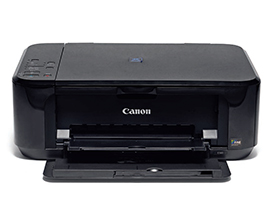
 Canon has established itself as a complete imaging company with capability to manufacture sensors, processors, lenses and cameras along with printers and scanners. On our test bench we have the Pixma E560 home multifunctional device.
At Smart Photography, we have been very strict about our review requirements and hence have always insisted on reviewing only serious photography and imaging products. But this time, the Canon representative claimed that the E560 is capable of good photo reproduction and insisted that it is very economical.
Design and Build Quality
The E560 has an engineering plastic exterior. Since it is a budget home printer, the build quality is not as impressive as the professional and semi-professional models. The flatbed scanner cover is predictably very fragile, because of variable-height hinges that enable scanning of thick media such as books. The printer has five buttons and the functions are clearly labelled. The cartridges are easy to replace, but there is no way to confirm that they have been installed properly, unlike in professional models which have LEDs on their cartridges for confirmation.
Key Features
The Pixma E560 is a home multifunctional device using Canon’s FINE ink cartridges. It uses a PG-89 (Black) and CL-99 (Colour) cartridge for printing. The printer can reproduce images with a maximum resolution of 4800 dpi (horizontal) and 1200 dpi (vertical). The printer has a total of 1792 nozzles, capable of a fine ink volume of up to 2picolitres.
Canon claims a print speed of approximately 44sec for a 4 x 6-inch photograph. It can accept a variety of media and supports up to 203.2mm of bordered and up to 216mm of borderless printing. It supports A4, Letter, 4 x 6, 5 x 7, and 8 x 10-inch papers. It can also accept DL, and COM10 type envelopes. It supports auto 2-sided printing for A4, A5, B5, and Letter size plain papers.
The E560 houses a flatbed scanner that uses Contact Image Sensor (CIS) method for scanning. It has a maximum optical resolution of 1200 x 2400dpi and it can be manually selected from 25 to 19200dpi. It has a bit depth of 16 bits for input and 8 bits for output in greyscale and 16bits and 8bits respectively for colour. It can scan grayscale images at up to 1.2ms/ line (300dpi) and colour images at up to 3.5ms/line (300dpi). It can scan reflective, A4 colour images (300dpi) in approximately 14sec. It can scan up to A4 / Letter size (216 x 297mm) documents. The copy function has a speed of approximately 25 sec for colour: sFCOT / Simplex type.
The device includes Wireless LAN network and is compatible with Google Cloud Print. The E560 has dimensions of 449 x 304 x 152mm (W x H x D) and weighs 5.4kg.
Ergonomics
The Canon E560 is easy to set up, and the print head comes pre-installed. To install the cartridges, you need to keep the front open and then switch on the printer. The printer will park the cartridges at the designated place and automatically open the cartridge chamber. The software allows you to monitor the device’s parameters, troubleshoot and run maintenance tasks with ease. There are shortcut buttons for colour and monochrome copying. For this, you do not need to connect the printer to the computer.
