

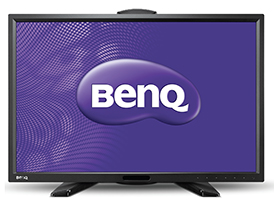
 Pofessional graphic monitors are a class apart, and most of them are so specialised that the brand names are rarely heard outside this small professional world. Graphic-specifi c monitors can produce a wide gamut of colours and can be calibrated accurately using specialised calibration hardware. BenQ PG2401 PT joins the highly competitive world of these colour specialists.
Design and Build Quality
Th e PG2401 is a pofessional monitor, and is built to feel like a professional equipment. The outer body is made of black matte polycarbonate material. The screen is matte-finished as in the case of all professional displays. It features a narrow bezel. At 7 kg (panel alone), the monitor is light and easy to relocate. The hood panels attach seemlessly and are made of durable material.
Key Features
The PG2401 PT is categorised in the CAD/CAM monitor series and is meant for uncompromising high-quality works such as graphic design and photography. The monitor is a 24.1-inch (W) IPS panel with LED backlighting. It has a maximum native resolution of 1920 x 1200 pixels. The monitor provides a native contrast ratio of 1000:1 and Dynamic Contrast contrast ratio of 20M:1. It provides a viewing angle of 178°. In HDMI, the monitor can display 1.07 billion colours from a palette of 4.4 trillion, while a DVI input allows it to display 16.77 million colours from 4.4 trillion. It has a wide colour gamut capable of reproducing 99 percent of Adobe RGB colour space and 100 percent CMYK colour space. Colour temperature can be set from 2800 to 9300K. You can either choose one of the pre-set values or set your own value from the Custom Mode at increments of 100K.
The device supports hardware calibration and the colour management system is developed by XRite, one of the leaders in colour management space. The monitor allows you to save diff erent colour profi les and calibration results and apply them selectively. This is a very useful feature since there are individual diff erences in the perception of colour. The calibration soft ware even allows you to preview how the colours would look when printed on various types of media and with diff erent colour spaces. Th is allows for better print matching. This can also help in acquiring G7/FOGRA/UGRA certifi cation for your colour lab. Another very important feature in the calibration soft ware is that it allows you to check if the monitor requires re-calibration. This is important since very frequent recalibration can affect he efficiency of colour management because of the repeated erasing and programming of data on the EEPROM (memory module). The 10-bit panel is capable of reproducing more than a Billion colours, which in turn facilitates smooth gradation of colours. The monitor is also capable of processing 14-bit images, ensuring true natural shades while processing images. Input connectors off ered are D-Sub, DVI, HDMI, DP, mDP, and Headphone jack. It also features 3 USB connectors — one at the base along with the other connectors, and two (USB 3.0) at the side along with an SD card reader.
Th e monitor has dimensions of 542.6 x 555.4 x 254mm (without hood) and weighs 12.4 kg.
Ergonomics
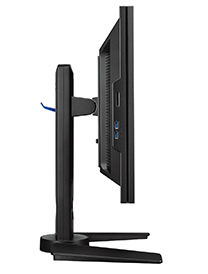
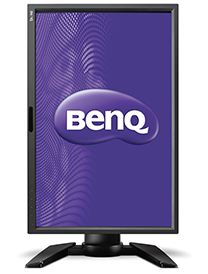
Th e PG 2401 is quite easy to setup, the hardest part being the installation of the hood. The entire equipment fits in a carton of dimensions 631 x 270 x 520mm. The monitor features a touch-sensitive control panel with self-illuminating display. This is quite responsive and easy to use. The display can be swivelled 45 degrees through left and right. Similarly, it can be tilted from -5 (down) to 20 degrees (up). The height can be adjusted up to 150mm. The PG2401 PT has a wide viewing angle of up to 178 degrees, but we wouldn’t advise you to view the images from the sides when you are working on a project. What differentiates BenQ from other similar models is that they have a professional team from Bodhi Professional Services, who are ready to help you will any technical issues including calibration.
 Performance
The PG2401 performed very well during our tests. The calibration and setup was done by the personnel from Bodhi Professional Solutions P Ltd, who are the distributors and service partners for BenQ. The calibration is fast (this depends on the hardware configuration of your computer) and easy. Since the calibration is done from the hardware, it remains unaltered even if you move the entire unit around, and the ambient light does not alter much.
Though we did not compare it with other similar monitors side-byside, we checked the uniformity of images from edge to edge and corner to corner. To eliminate any chance of error, we enlarged a small portion from an image captured with a high-end D-SLR and duplicated the image multiple times so that it filled the entire screen. Then we checked (visually) for any perceptible change in sharpness, colour, and light intensity, signs of distortion and darkening of corners. We did not notice any of the abovementioned flaws in the display.
Value for Money
The BenQ PG2401 PT retails at an MRP of Rs.115,000, but you probably can get a good discount. You cannot compare this price to that of an ordinary monitor, but this monitor is no ordinary one. Hardcore graphic monitors are priced similar to this, and a hardware calibrated one is certainly expensive. So this is fair pricing for this device.
PLUS
• Hardware calibrated
• Wide range of print matching options
• Professional service
• Impressive performance
MINUS
• None observed
FINAL SCORE 87%
Design and Build Quality 18/20
Key Features 18/20
Ergonomics 17/20
Performance 18/20
Value for Money 16/10
VERDICT
The BenQ PG2401 PT is one of the top models for high-quality graphic design and professional photo editing works. If you are looking at uncompromising quality and the ability to match the colours to a wide range of printing presses and output media, we would strongly recommend the PG2401 PT. Combined with prompt service, the monitor is certainly a Best Buy.
Sujith Gopinath