

• Skip to main content
  • Skip to primary sidebar
  • Skip to footer
  • HOME
  • News
  • Reviews
    • Cameras
    • Head-to-Head
    • Books
    • Monitors
    • Lenses
    • Smartphones
    • Software
    • Printers
    • Accessories
    • First Look
  • Contests
    • EISA Maestro
    • Picture of the Month
    • Smart Travel Contest
  • Tutorials
    • Ask Uncle Ronnie
    • Basics of photography
    • Camera Techniques
    • If I were You
    • Photoshop
    • Tips
  • PHOTOLOGUE
    • Kaleidoscope
    • Master Craftsmen
    • Showcase
    • Travel Photo-feature
  • Promotions
  • More
    • Buyer’s Guide
    • Subscription
    • Digital Subscription
    • Print Magazine
  • Advertise

How to Select and Darken Sky like a Pro

June 14, 2017 by SPEdit Team

JImageEditing1
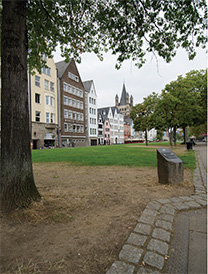
Original Image

We often wish to darken the sky in a landscape photograph – only the sky. Sometimes, we can accomplish this by selecting the sky using a simple tool like the Magic Wand or the Quick Selection Tool and then with the sky selected, we merely use Levels or Curves to darken the selected area. Things get difficult however, if there are projections rising into the sky (like trees) and the sky can be seen through the little gaps in the tree branches/leaves. Here is a method that will get you through but it is assumed that you have been following this series of Image Editing and that by now you are familiar with the basic tools.

1. Open the image in ACR (Adobe Camera Raw) in Photoshop. The image could be a JPEG or TIFF but Raw is preferred. I am using Photoshop CS6 but you can use any version that you have. Set your Black Point and the White Point by adjusting the Black slider and the Whites slider.

Read More…

Filed Under: Photoshop, Tips, Tutorials Tagged With: darkening sky, editing, photo editing, Photography, Photoshop

Primary Sidebar

Search

LATEST ISSUE

THE EISA AWARDS 2026–2027

EISA MAESTRO 2026 THEME: Travelling

Smart Photography Awards 2026

EPSON EcoTank L8180

EISA AWARDS 2025-26 ‘In the Spotlight’

MAGZTER Subscription Offer

Tags

Apple award awards benq Camera Canon contest d-slr eisa epson Fujifilm full frame GoPro Huawei India Launch Leica lens lumix mirrorless camera monitor nikkor Nikkor lens Nikon oneplus oppo Panasonic Photography Photography Contest Photography Exhibition photography tips Photokina Photoshop Review samsung sigma Smartphone Smartphones smart photography Sony Tamron technology Travel travel photography vivo

Footer

Recent

  • August 2026
  • Viltrox introduces pancake lens for Panasonic S 9
  • EISA Maestro 2026 – Public Choice Award
  • Nothing Introduces Phone (4b)
  • July 2026

Search

Tags

Apple award awards benq Camera Canon contest d-slr eisa epson Fujifilm full frame GoPro Huawei India Launch Leica lens lumix mirrorless camera monitor nikkor Nikkor lens Nikon oneplus oppo Panasonic Photography Photography Contest Photography Exhibition photography tips Photokina Photoshop Review samsung sigma Smartphone Smartphones smart photography Sony Tamron technology Travel travel photography vivo

Copyright © 2026 · Smart Photography Magazine ·